Let the alert watch the level so you do not have to
You stared at four charts for two hours, looked away, and missed the touch. Or the alert fired nine times on the same wick and you muted it. Both problems are settings.
Alerts that fire on every tick train you to ignore alerts
Price does not touch a level once. It grinds around it. Put a plain crossing alert at 451.00 and a slow tape will send you nine notifications in a minute.
After a week of that you swipe them away without reading. The one that mattered arrives inside the noise and gets the same treatment.
The other failure costs options traders more. You watch four charts, wait for something, and pay time decay while nothing happens. Attention runs out around 11 am, which is roughly when the setup you drew at 8:30 finally shows up.
Both come from settings you can change in ten minutes on a Sunday. The alert can watch the screen for you. It can also stay quiet until the candle actually closes.
One alert per zone, set before the open
Create alerts from the Alert button in the top toolbar, or by right-clicking the price level on the chart. Right-clicking is faster once your zones are drawn.
Match the condition to the direction. Crossing up for a zone above price, crossing down for a zone below. Plain crossing fires both ways, which you rarely want on a level you approach from one side.
Greater than and less than do a different job. They describe a state rather than an event. That suits a gap fill or an opening range better than a touch.
Put the alert on the zone edge nearest price rather than the middle. You want to hear about it while there is still room between price and your stop. Then type the action you will take into the alert message, in plain words.
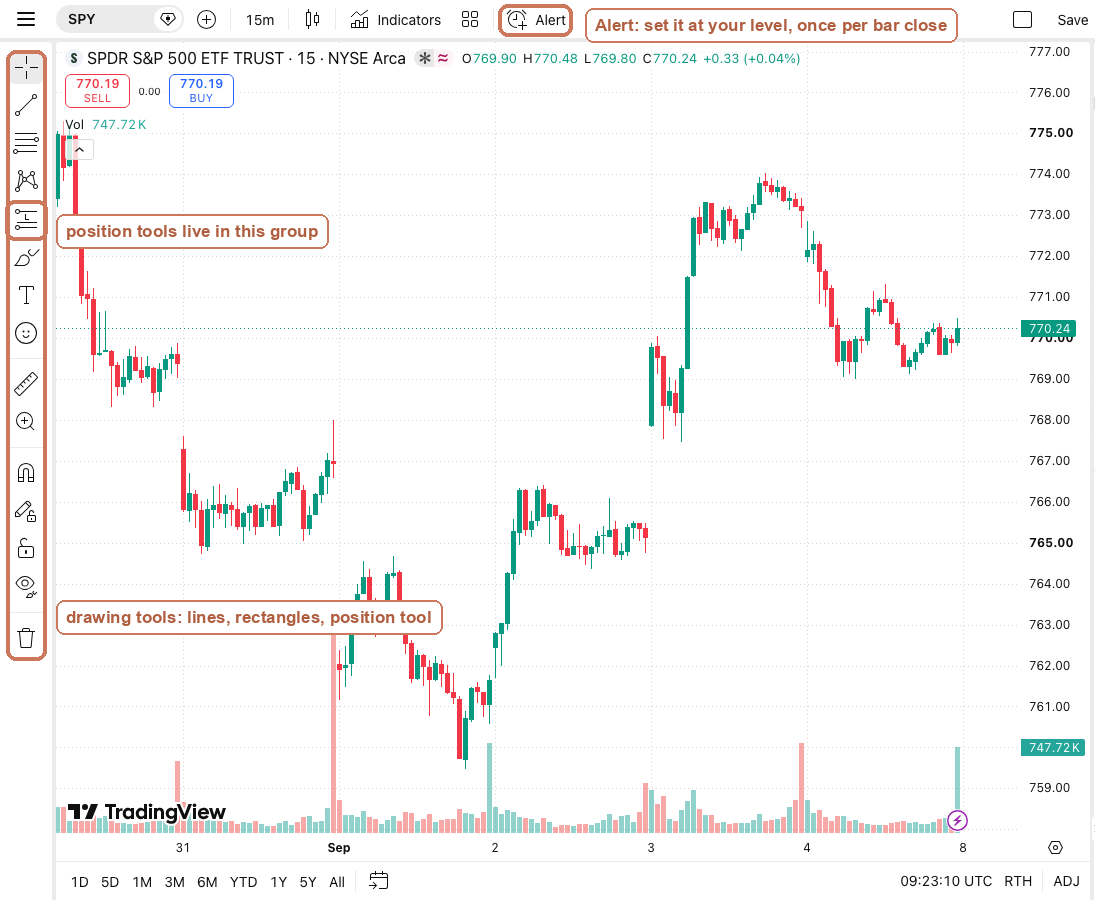
Once per bar close is the setting that matches a close-based stop
TradingView lets an alert fire once, once per bar, or once per bar close. The last one matches how you exit.
A wick through your level does not put you out of the trade. A close beyond it does. The wick is the shakeout around the level, and the close is the information.
So set stop alerts to once per bar close on the timeframe you entered on. On a 15-minute chart it can only speak at :00, :15, :30 and :45. And only if the close landed on the wrong side.
This costs you time by design. You hear about a break several minutes after it starts. In exchange, a two-cent poke that comes straight back stops waking you up. Use once per bar for approach alerts, so a level price is hovering at reports once a candle.
When it fires, check the four parts before you click
An alert means price arrived. Nothing more. Before you enter, three conditions still have to be true. The zone matters, a pattern formed at it, and volume showed up.
Then say the plan in four parts. What must be true, the exact entry and strike, the stop, and the target. If any part will not go into words, there is no trade.
Check the geometry with the position tool before clicking. Stop and target are already fixed by the chart. So there is a last price at which the trade still pays two to one. Past that price, let it go.
On a zero-day expiry, add a time stop. No breakout by the fifth candle of your entry timeframe and you are out, because decay is charging rent. With a week left, hold and give it the session.
The pre-open alert routine
Do this once, before the first candle. It takes about ten minutes and it ends the staring at charts. Then the alerts do the watching for you.
- Draw your zones first, then set alerts on them.
- Right-click the zone edge nearest price to create the alert.
- Pick crossing up for zones above and crossing down for zones below.
- Set stop alerts to once per bar close.
- Set approach alerts to once per bar instead of every tick.
- Match the alert chart timeframe to your entry timeframe.
- Type the action you will take into the alert message.
- Delete yesterday's alerts before the open.
- Check the zone, the pattern and the volume when one fires.
- Read reward-to-risk off the position tool before clicking.
- Skip any setup that no longer pays two to one.
- Log the fill and note which alert produced it.
Frequently asked questions
The frequency is set to every tick or once per bar. Switch it to once per bar close and it can only speak when the candle finishes.
An alert is a notification. Your protective stop belongs at your broker, and the alert only tells you to go and look.
One per zone, so about six on a symbol you have drawn properly. Past that you stop reading them, which is worse than having none.
Get the Morning Map zones before the open
The Morning Map emails you the model's support and resistance zones for SPY, QQQ and IWM at 8:40 ET. It is free. Set your levels from it, then tick key levels identified on TraderLog's pre-session checklist.
Every trading morning at 8:40 ET our model draws the SPY, QQQ and IWM zones it expects to matter, on a TradingView chart, before the open. Where price reaches one, it has turned 74 percent of the time. Free, no account. See today's map